Friday, June 4, 2021

How to Copy Instagram Link

How to copy the URL of Instagram Image on PC/Laptop

This Steps is only for Mobile. If Don't know How to Copy Instagram Link in SmartPhone Click Here!!

  1. First, Open your Instagram account on your PC/Laptop
  2. Now, find the image you want to copy its link
  3. Next, tap on the three dots icon to open the pop-up menu and in below image you can clearly see where is three dots.
    Three Dots
    Three Dots in Instagram Image.

  4. Next, tap on Copy link and in below image you can clearly see where is Copy link.
    Copy Link
    Copy Link in Instagram Image.

    Your Instagram Image Link is Successfully Copied!!
If this Article helps you, So Please Share this Article and If any problem occurs So, Please Contact Us.

Related Article:-   How To Copy Any YouTube Video Link In PC

Sunday, May 9, 2021

How to Copy any YouTube Video Link in PC

In this post I am telling you steps of Copy any YouTube Video Link

This Steps is only for Windows System, PC or Laptop.

If you want steps on how to copy any YouTube Video Link.

 In this post I am telling you steps of Copy any YouTube Video Link
  1. First, Open YouTube
  2. Then, Open Your YouTube Video that you want to copy link
When you Open the Video, You can see some kind of interface like
below photo.

Share button on YouTube Video, Copy YouTube Video Link via Share button
Share button

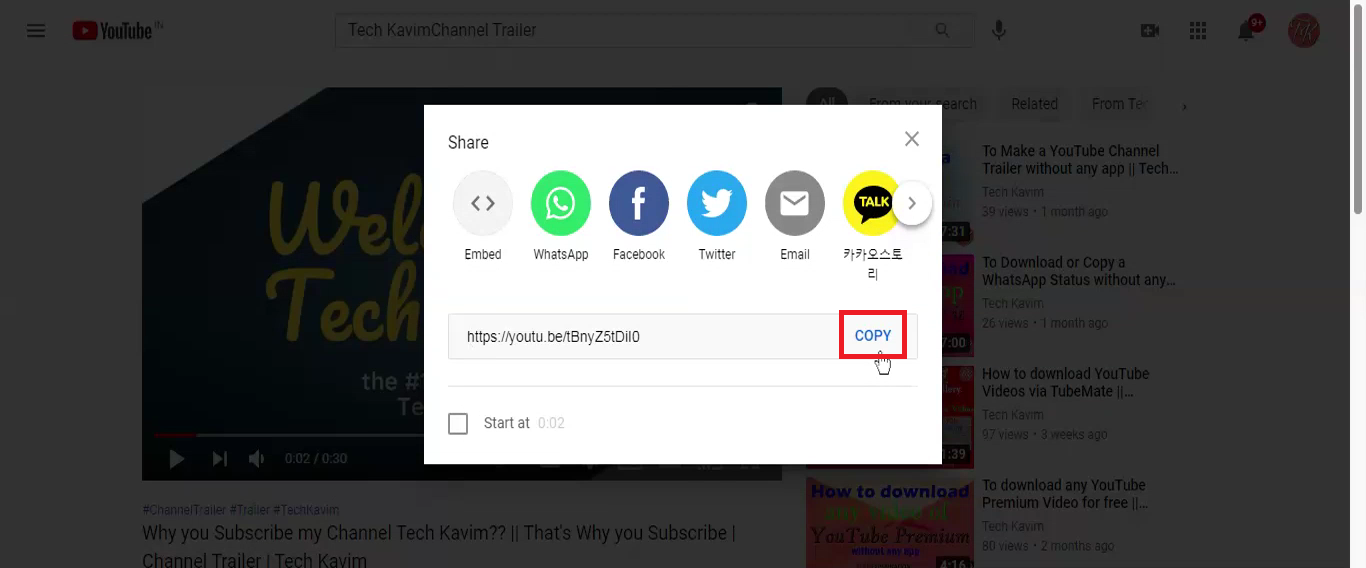
When you Press the Share button, You can see some kind of interface like
below photo.

Copy link button in Share button, Share button, Copy link button
Copy link button in Share button

In above picture you can see the Copy button on Share option

      3. Press, the Copy button

When you Press the Copy button, You can see some kind of interface like
below photo.

YouTube Video Link Copied to Clipboard

Your link of YouTube Video Successfully Copied!!